Ready before work starts
Review predecessors, lag dates and blocking conditions. Understand why a task can proceed—or what still needs attention.
 SampraxisTechnologies
Built in India. Products in testing.
From the first quantity to the final handover. Construction software that brings the plan, the site and the accounts into the same conversation.
Time, progress and cost.
One connected project story.
The same work appears in a schedule, a daily report, a material register and a bill.
Sampraxis is being built to preserve those connections. Give every team the context behind the numbers, and spend less time joining the pieces by hand.
Explore what an approved Daily Progress Report can feed. Select a connection to see why it matters.
Progress, quantities, labour and site evidence enter a controlled review workflow.
Interactive workflow illustrationApproved usage can feed material records, helping the team connect what was consumed to the work that was reported.
A clearer trail from stock to site activity.
Approval-driven workflows are implemented in source and remain subject to testing and rollout controls. This illustration does not submit or change project records.
Meet AI Copilot
A practical way into your project information, using everyday questions.
Explore schedule, procurement, materials and financial summaries through defined tools. The advanced evidence-based path is designed to connect answers to authorized project records.
People certify the work, accept quality and authorize payments.
What this question helps you explore
Bring task status and schedule information into the review, then investigate the records behind the delay.
Illustrative prompts, not live AI answers. Tool access and advanced capabilities depend on configuration and activation.
Real development screens. Explore the plan, performance trends and evidence behind the work.
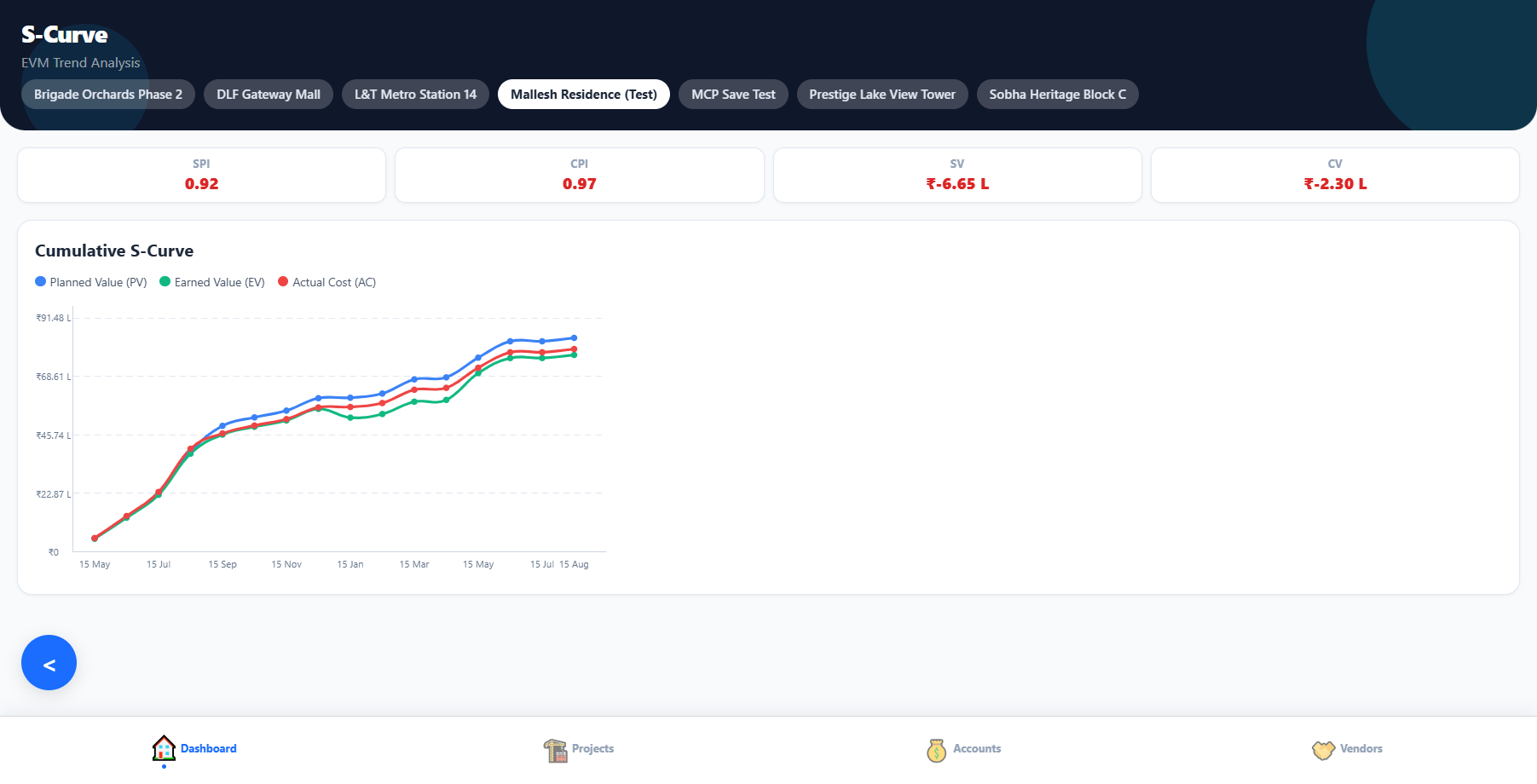
S-curve: compare planned value, earned value and actual cost over time. Historical test-project capture; names and figures are development examples, not customer results.
Test data · click image to enlargeConstruction needs more than a progress percentage. These workflows bring the supporting records into view.
Review predecessors, lag dates and blocking conditions. Understand why a task can proceed—or what still needs attention.
Connect purchase orders, goods receipts and bills. Compare quantities and rates before commercial review.
Keep subcontract assignments and agreement evidence alongside reported and measured quantities.
Retain inspections, concrete and soil tests, curing records and approval context as the work progresses.
Rules cover missing reports, overdue tasks, low stock, cost pressure, outdated drawings and stalled approvals.
Review certificates, outstanding items and warranties. Preserve the evidence needed to close the work.
Project records meet commercial control
S-curves compare planned value, earned value and actual cost. Cash-flow and budget views add another dimension to the review.
Contractor costs and margins serve a different purpose from client funds managed by a PMC. The accounting model must respect that distinction.
Financial records support receivables, payables and reporting. GST/TDS preparation remains subject to accounting review; automatic government filing is not claimed.
Sampraxis CAD
Homegrown CAD in development: plan and model views, building elements and drawing sheets. Our longer-term ambition is a traceable connection from design quantities to project execution.
Plan and 3D views of an adapted sample duplex, with room properties in the same workspace.
Development capture · click image to enlargeSample model adapted from BSI (2020) Duplex Apartment Test Files, buildingSMART International, CC BY 4.0. Simplified walls and openings; some building elements omitted. This demonstration does not imply IFC import support.
Planning, site records, performance views, procurement controls, AI assistance and a developing CAD workspace.
Advanced source-cited answers, Project Confidence and payment-readiness flows need activation and joined-workflow validation.
CAD-to-project exchange and expanded AI-assisted modelling. Pilot measurement will establish time and cost benefits.
Screenshots contain development and historical test data, not customer results. This website is based on a source review dated 19 September 2026. Live deployment and complete end-to-end journeys were not reverified. Affordable access is a product goal; prices and measured savings have not been announced.
For the teams building our everyday world